
Process documented: July 18, 2026
1. Authorized users sign in
ApolloEMS SMS enrollment is available only to authorized users with an active ApolloEMS account. The user signs in at https://apolloems.org/login and opens the SMS Notifications card from the employee dashboard.
ApolloEMS does not request SMS consent through an unsolicited text message. Consent is collected through the authenticated dashboard.
2. The employee reviews the mobile number
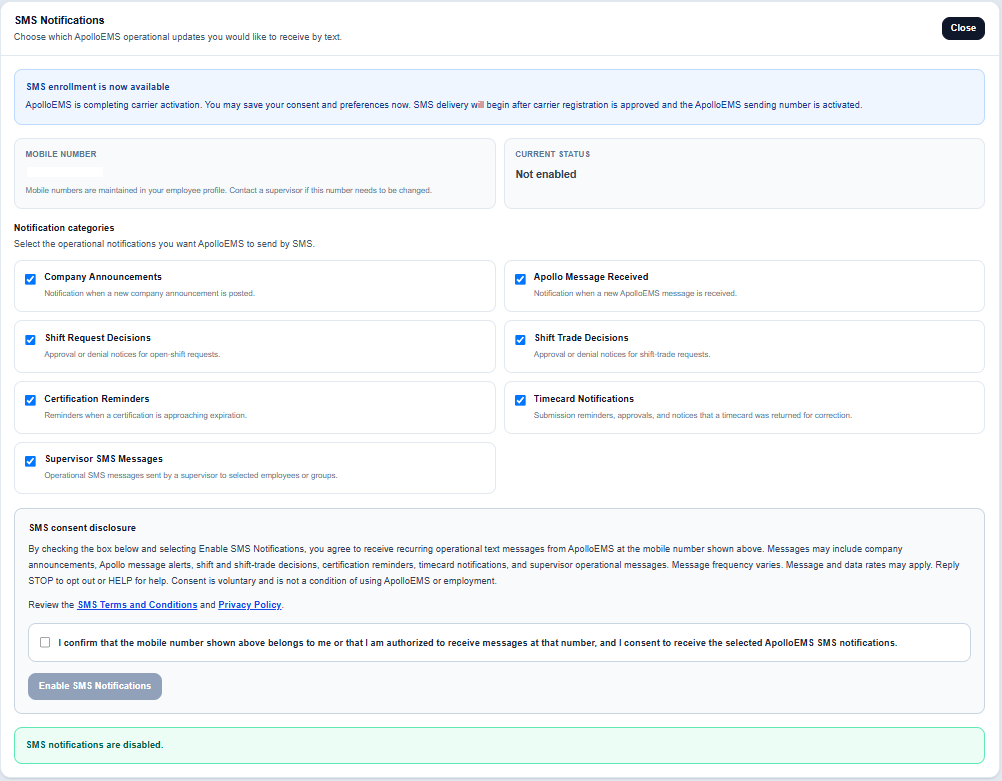
The SMS card displays the mobile number maintained in the employee's authorized profile. The number is read-only in the consent interface. If it is missing or incorrect, the employee must contact an authorized supervisor to update the employee profile before providing SMS consent.
3. The employee selects notification categories
The employee may select operational categories including:
- Company announcements.
- ApolloEMS message-received notifications.
- Shift-request approval or denial notices.
- Shift-trade approval or denial notices.
- Certification-renewal reminders.
- Timecard reminders, approvals, and correction notices.
- Operational messages sent by authorized supervisors.
4. Affirmative consent is required
Before enrollment, the employee is shown the complete SMS disclosure, message categories, varying message-frequency notice, message-and-data rate disclosure, STOP and HELP instructions, and links to the public SMS Terms and Conditions and SMS Privacy Policy.
The consent checkbox is unchecked by default. The Enable SMS Notifications button remains disabled until the employee affirmatively checks the consent box. Consent is voluntary and is not a condition of using ApolloEMS or employment.
ApolloEMS does not share, sell, rent, or otherwise provide mobile phone numbers or messaging consent information to any third parties or affiliates for marketing or promotional purposes.
5. ApolloEMS records the consent
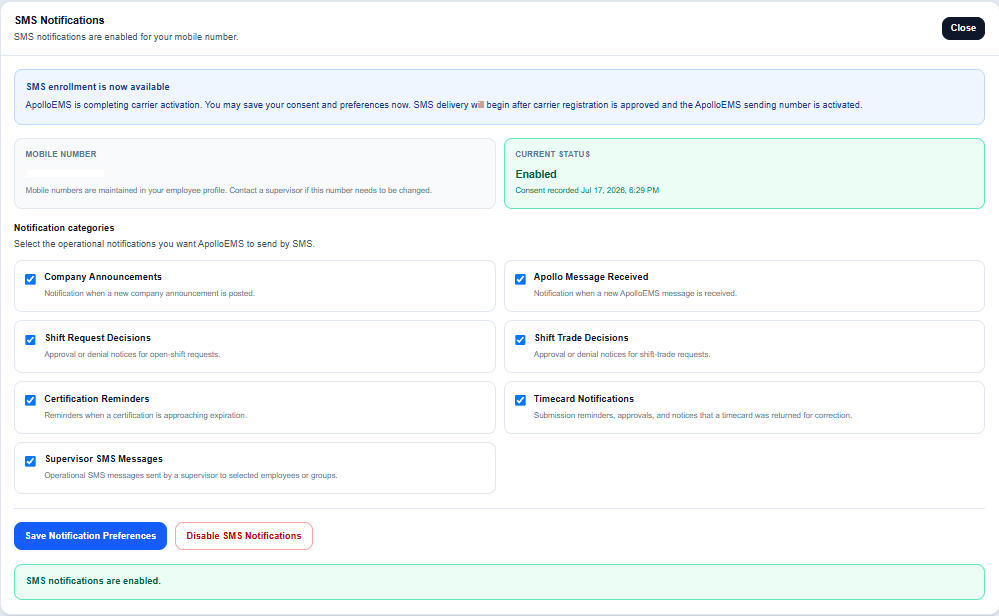
When the employee enables SMS notifications, ApolloEMS records the employee identifier, authorized mobile number in E.164 format, selected notification categories, consent timestamp, disclosure version, and consent source. If the profile mobile number later changes, ApolloEMS suspends eligibility for SMS delivery until the employee reviews the disclosure and authorizes the new number.
6. Opt-out process
An enrolled employee may disable SMS notifications through the same dashboard card at any time. Recipients may also reply STOP to an ApolloEMS SMS message. ApolloEMS records the opt-out time and source and suppresses future SMS delivery unless the recipient later opts in again. Recipients may reply HELP for assistance.
7. Support
Questions about SMS enrollment or the ApolloEMS notification program may be sent to support@apolloems.org.